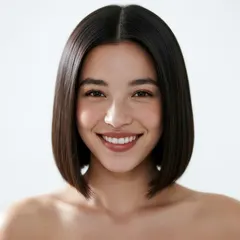
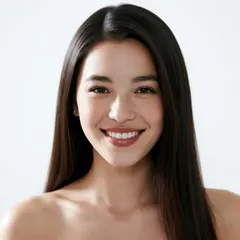
Long hair to a bob
↗Compare the length, jawline framing and overall shape.
Explore how a different haircut could change the mood of a portrait. An AI hairstyle changer lets you compare a bob, soft waves, long layers or a textured crop using your own adult photo.
Long hair to a bob
Drag the slider to compare ↔External reference examples, not results generated by this application. Your result may differ.Upload only your portrait, then select a photographed haircut. No second upload needed.
Open the AI Hairstyle Changer tool ↗Two photographed hairstyle reference comparisons.
Drag either slider to compare.
Compare the length, jawline framing and overall shape.
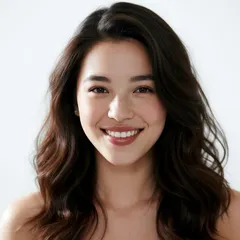
Explore how a wavy shape changes the outline around the face.
External reference examples, not results generated by this application. Your result may differ.
Explore how a different haircut could change the mood of a portrait. An AI hairstyle changer lets you compare a bob, soft waves, long layers or a textured crop using your own adult photo.
Use an image with your face and hair clearly visible and avoid hats or heavy shadows across your head. The tool aims to preserve your identity while interpreting a selected hairstyle. It is a visual styling exercise, not a prediction of a salon result or a change to your face or body.
A haircut can change the balance and mood of a portrait even when your outfit stays the same. Begin with one adult photo where the face, hairline and outline of the head are easy to see. Soft daylight and a plain background make a useful starting point. Remove hats and avoid a hand resting across the forehead. A photograph taken straight on or at a modest three-quarter angle generally communicates more of the face than a strong side view. Your uploaded image remains the identity reference throughout the request.
The hairstyle collection contains photographed reference looks, with filters and search to help you find a direction. Explore short crops, bobs, layers, waves, braids or longer styles, then choose the one whose shape interests you. You only upload your own portrait for a haircut-only request. The selected collection image is supplied as the haircut reference behind the scenes. Its purpose is to describe the cut and shape, not to replace your face with the reference person. The request also aims to preserve your natural hair color rather than introducing an unrelated color treatment.
After generation, move the slider around the forehead, ears, temples and shoulders. Look at where hair meets the face, how the volume sits and whether the overall length matches the direction you selected. AI can interpret strands, texture and lighting differently, particularly when existing hair obscures part of the face. Keep the original portrait available and compare a few distinct directions instead of repeatedly editing one imperfect output. This visual exercise is not a salon consultation, an assessment of hair health or a guarantee that a style can be reproduced with your natural texture.
Use the Hairstyle tab when you only want to see a haircut. If you want to coordinate clothing as well, open Outfit, upload one clothing reference and enable Also change hairstyle to choose a cut. The combined still follows the same image cost, so you can explore a broader mood without separate category orders. Inputs and generated images must pass adult-content and minor checks, including photographed hairstyle references. Only use consenting adults. The service does not alter facial structure, body shape or intimate features as part of a hairstyle change.
No. Upload your own portrait and choose a photographed haircut from the collection. The selected image supplies the cut reference. To combine clothes and hair, open Outfit, add a clothing reference and enable Also change hairstyle.
The request uses your portrait for identity and the catalogue image for haircut shape. It instructs the model to keep your face. AI results can still vary, so inspect facial details as well as the hair.
Choose an uncovered head whenever possible. A hat conceals the hairline and head outline, making a realistic haircut interpretation more difficult. Even lighting and a clear view of the temples are helpful.
No. The picture is an imaginative preview. Natural texture, density, maintenance and styling techniques affect real haircuts. A stylist can help determine what is practical for your hair; the tool cannot make that assessment.
Yes. Choose only Hairstyle and the request aims to keep your outfit, pose and setting. For a coordinated clothing change, use Outfit with its optional hair switch and a clothing reference.
Each account receives 10 free credits daily without a card. A still costs 10 credits. Free results have a watermark, and the daily allowance resets at 00:00 UTC without carrying unused credits forward.